How to set up and manage joint clients
Last updated: October 12, 2026
This article shows you how to link two client records so that spouses, family members and business partners share one connected relationship, with their meeting history and reports sitting together, and how to get a report that covers both of them.
A joint client is two separate client records linked together. Each person keeps their own record, meeting history and documents, and one of the two is the lead client. Once linked, reports and letters can be written for both people, provided the template supports two clients.
Before you begin
- You need both people set up as clients. Add the second person first if they are missing: see Manually adding a new client.
- You must own both client records. Only the adviser who owns a client can view, add or remove that client's joint relationships, and you cannot link your client to another adviser's client, even inside the same group.
- Decide which person is the lead client. The lead is the record you open to create joint reports.
Link two clients
- Open the lead client's record from the Clients page.
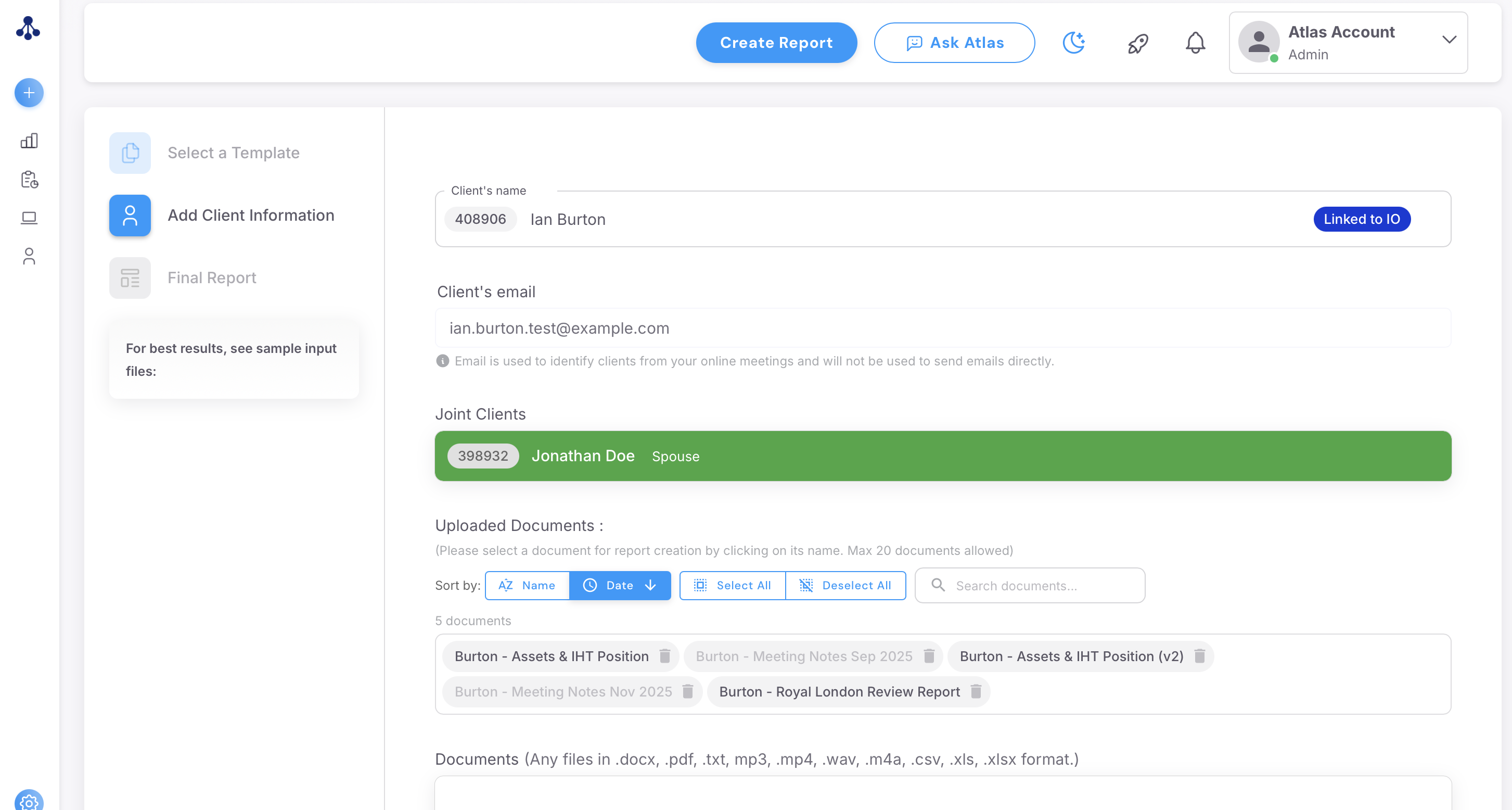
- Go to the joint clients section, using the link option in the bottom right of the client page, to add the second client, and choose the relationship type that applies.
- Check the second client's record. The link works both ways, so once Client A is linked to Client B, Client B shows as linked to Client A without repeating the step from their side.
Please note: the relationship label is for your reference and does not change what a report says. Pick the one that fits and move on.
If two advisers at the same firm need to see each other's linked clients, that is set up through a shared or Supervisor-level account rather than the standard joint client link. Email support@advisoryai.com to arrange it.
Create a joint report
- Start the report from the lead client. Open the lead client's record and create the report as you normally would.
- Upload documents for both people. A joint report pulls from both client records, so each person's documents need to be attached to their own record or to the report.
- Generate the report. Where the template supports two clients, the output addresses both people, with "his" and "hers" columns in tables, and the finished report files under both client records.
Please note: a template has to support two clients for a joint report to address both. If your template only ever writes for one person, ask support@advisoryai.com whether a joint version exists for it.
A joint report only covers one of the couple
If a review or suitability report comes back with only one person's data, risk group or discussion, work through these in order.
- Check the two clients are linked. This is the usual cause. Open the lead client's record and confirm the second client appears as a joint client. If not, link them as above and regenerate.
- Check both sets of documents were attached. A document saved against one record only informs that person's section.
- Regenerate the affected section and name both clients. If most of the report is right but the second person is thin in one place, regenerate that section and state both clients by name in your instruction, for example "cover both John Doe and Jane Doe's attitude to risk". Extraction for the second client improves markedly once the records are linked.
- Send it to support if it still misses a person. Adding a second client and regenerating can change a note substantially, and the team investigates these case by case. Email support@advisoryai.com with the report URL, the two client IDs and which sections are missing.
Combine two existing records
Two records for the same person: use the Duplicates view on the Clients page and merge them. See Find and merge duplicate clients.
Two people you want as one combined record, for example a single profile named for both partners: email support@advisoryai.com with the two clients and confirm you want them combined, and the team does it for you. Linking as joint clients is the normal route, and it keeps each person's history separate.
See it in action
Add the second client along with the relationship type that applies.
Next steps
- Link any couples you already advise before their next review, so the first joint report draws on both records.
- If a joint report still comes back one-sided after linking, send the report URL to support@advisoryai.com.
Related articles
- Manually adding a new client
- Find and merge duplicate clients
- How to create your first report
- Licences and Roles Explained
Ready to link a couple? Open AdvisoryAI, go to Clients and open the lead client's record.