Introduction to Emma
Last updated: August 11, 2026
Emma is AdvisoryAI's report writing assistant, built to help your team create professional, compliant client reports in a fraction of the time it takes to write one from scratch.
What Emma Does
Rather than starting every report from a blank page, Emma uses the information you provide — meeting notes, client details, or an Evie meeting transcript — to draft a structured, professional report automatically. You can then refine it using plain language instructions, and Emma will adjust the tone, structure, or content accordingly.
Emma also supports firm-wide bespoke templates, meaning we can integrate your existing templates into the platform. Our in-house delivery team can rebuild your template to match your exact document structure, formatting, tone of voice, and advice style, so the baseline draft already reflects your house style rather than a generic format.
If you'd like to integrate your own firm templates onto the platform, contact support@advisoryai.com or your account manager, and we'll go through options and pricing with you.
What reports can Emma Create
Emma can draft a number of different report types on the AdvisoryAI Platform, saving up to 80% of suitability report production time for Paraplanners. Some of these report types include;
Pension Transfer
Withdrawal Report
Fund Switch
Annual Review Report
LOA Pack Summary
Protection Report
Mortgage Report
What Documents to Upload for Emma
To give Emma the input documents it needs to create a report, you can either:
Select from documents already on the platform — usually transcripts or meeting notes generated by Evie
Upload a document yourself, in any of the following formats: .docx, .pdf, .txt, .mp3, .mp4, .wav, .m4a, .csv, .xls, .xlsx
For best practice, you'll see sample input documents on the left-hand side of the screen when creating a report.
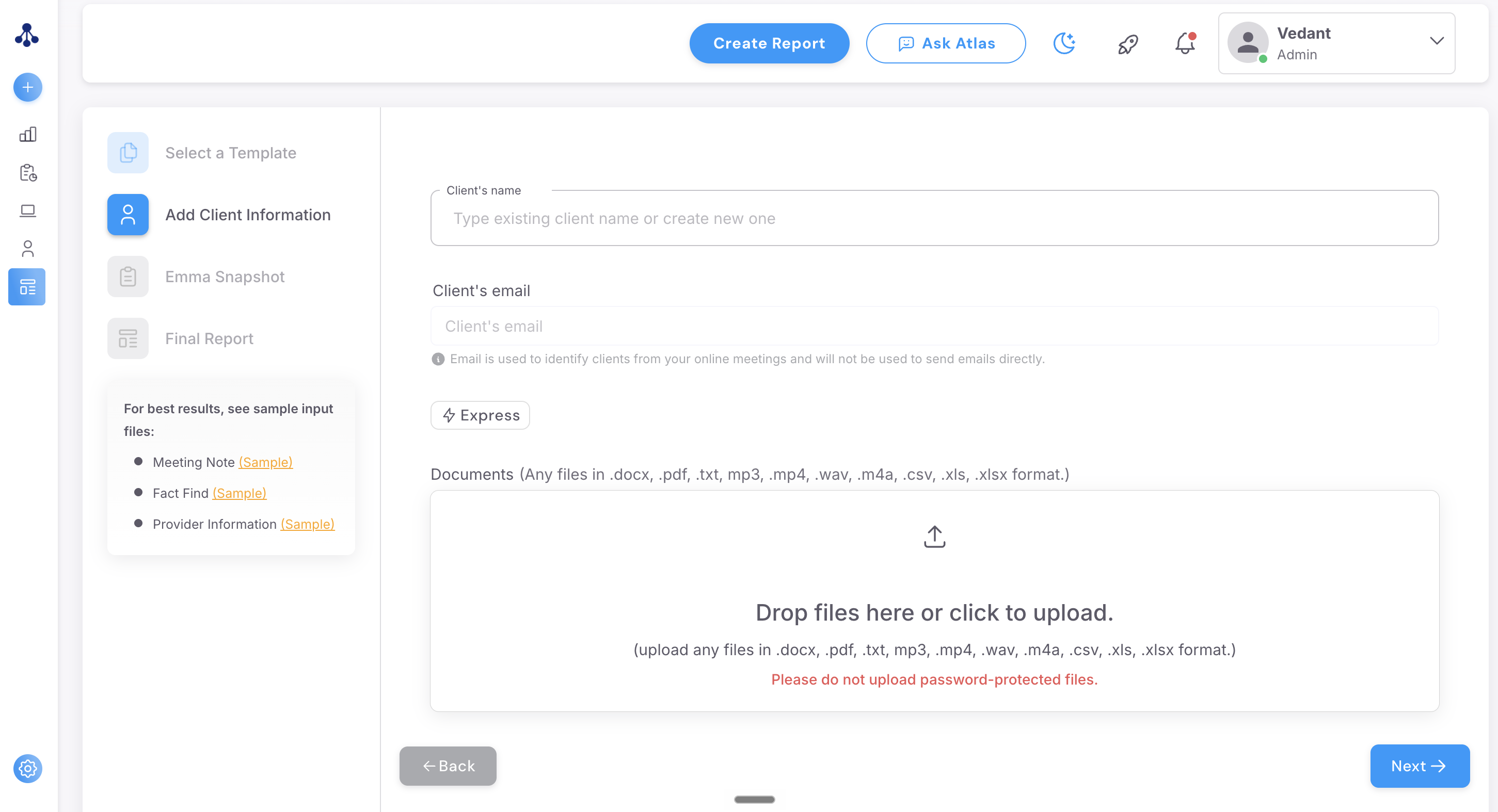
To understand which documents you should upload for which report, see our article on How to create your first report
Emma : Key Features
Automatic report drafting — generate a full report from client information or meeting notes
Template and logic system — build reusable templates for your most common report types
Tone and style control — customise reports to match your firm's voice
Multi-adviser support — all advisers can work from the same templates for consistency. Likewise, template access can also be restricted across your organisation using groups : See our article on Group Management
Compliance-ready language — structured output designed with financial advice in mind
Flexible export — download as PDF or Word to fit your existing workflow
FAQ
Can multiple people use the same template?
Yes — that's the point. Shared templates mean everyone on your team produces consistent, on-brand work without extra effort.
What's the difference between Snapshot and Express?
Snapshot is Emma's original method — it summarises your documents first for you to review per section, then writes each section from that summary.
Express is the newer approach, reading your documents directly rather than working from a summary, and is being rolled out as the default across accounts. See our article on Emma Express for the full detail.
Can I add more report templates to my account?
Yes — this is worth a conversation with your account manager or by reaching out to support@advisoryai.com, since it usually means agreeing scope and cost for the new templates.
Why don't the figures in my report exactly match my documents?
This is often caused by the quality of document uploaded — such as by providing conflicting figures across multiple uploaded documents, or an outdated valuation sitting alongside a current one. Uploading a clean, current and compact set of documents is the best way to avoid this.
If you are consistently experiencing issues with your reports reflecting accurate information, please email support@advisoryai.com and we will be happy to look into this for you.